ACC : ACC Widgets

ACC Widgets
The widgets on each tab are interactive. You can set filters and drill down into the display to customize the view and focus on the information you need.
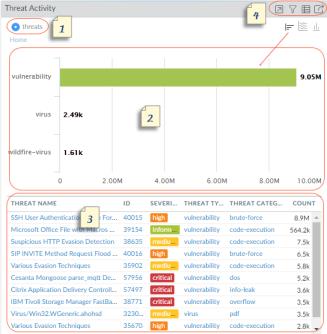
Each widget is structured to display the following information:
•
Maximize view—Allows you to enlarge the widget and view it in a larger screen space. In the maximized view, you can see more than the top ten items that display in the default widget view.
•
Set up local filters—Allows you to add filters that refine the display within the widget. See Working with Filters—Local Filters and Global Filters.
•
Jump to logs—Allows you to directly navigate to the logs (Monitor > Logs > <log-type>). The logs are filtered using the time period for which the graph is rendered.
•
Export—Allows you to export the graph as a PDF.
For a description of each widget, see the details on using the ACC.
ACC