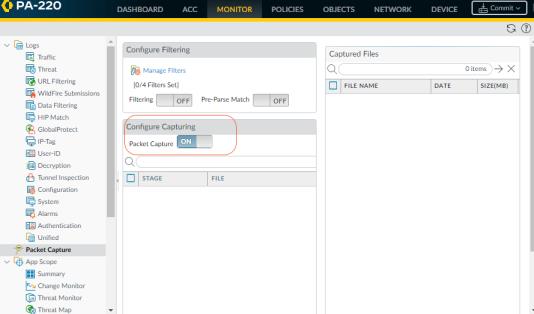
The following table describes the components of the Monitor >
Packet Capture page that you use to configure packet captures, enable packet capture, and to download packet capture files.
|
|
|
|
|
|
|
Click Add to add a new filter and configure the following fields:
|
•
|
Id—Enter or select an identifier for the filter.
|
|
•
|
Source—Specify the source IP address of the traffic to capture.
|
|
•
|
Destination—Specify the destination IP address of the traffic to capture.
|
|
•
|
Src Port—Specify the source port of the traffic to capture.
|
|
•
|
Dest Port—Specify the destination port of the traffic to capture.
|
|
•
|
Proto—Specify the protocol number to filter (1-255). For example, ICMP is protocol number 1.
|
|
•
|
Non-IP—Choose how to treat non-IP traffic (exclude all IP traffic, include all IP traffic, include only IP traffic, or do not include an IP filter). Broadcast and AppleTalk are examples of Non-IP traffic.
|
|
•
|
IPv6—Select this option to include IPv6 packets in the filter.
|
|
|
|
|
|
|
|
|
Set the Pre-Parse Match setting to ON to emulate a positive match for every packet entering the system. This allows the firewall to capture packets that do not reach the filtering process. If a packet is able to reach the filtering stage, it is then processed according to the filter configuration and discarded if it fails to meet filtering criteria.
|
|
|
|
|
•
|
Stage—Indicate the point at which to capture packets:
|
|
◦
|
drop—When packet processing encounters an error and the packet is dropped.
|
|
◦
|
firewall—When the packet has a session match or a first packet with a session is successfully created.
|
|
◦
|
receive—When the packet is received on the dataplane processor.
|
|
◦
|
transmit—When the packet is transmitted on the dataplane processor.
|
|
•
|
File—Specify the capture file name. The file name should begin with a letter and can include letters, digits, periods, underscores, or hyphens.
|
|
•
|
Packet Count—Specify the maximum number of packets, after which capturing stops.
|
|
•
|
Byte Count—Specify the maximum number of bytes, after which capturing stops.
|
|
|
|
|
|
•
|
File Name—Lists the packet capture files. The file names are based on the file name you specify for the capture stage
|
|
•
|
Date—Date the file was generated.
|
|
|
|
|
Click Clear All Settings to turn off packet capture and to clear all packet capture settings.
|
 ) before any new PCAP files display in this list.