 |
||
|
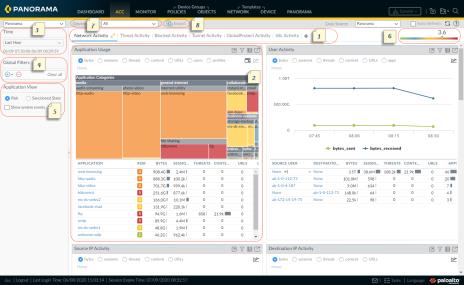
The ACC includes predefined tabs that provide visibility into network traffic, threat activity, blocked activity, tunnel activity, and mobile network activity (if GTP security is enabled). For information on each tab, see ACC Tabs.
|
||
|
Each tab includes a default set of widgets that best represent the events and trends associated with the tab. The widgets allow you to survey the data using the following filters: bytes (in and out), sessions, content (files and data), URL categories, applications, users, threats (malicious, benign, grayware, phishing), and count. For information on each widget, see ACC Widgets.
|
||
|
Virtual System: On a firewall that is enabled for multiple virtual systems, you can use the Virtual System drop-down to change the ACC display to include all virtual systems or just a selected virtual system.
Device Group: On Panorama, you can use the Device Group drop-down to change the ACC display to include data from all device groups or just a selected device group.
Data Source: On Panorama, you can also change the display to use Panorama or Remote Device Data (managed firewall data). When the data source is Panorama, you can filter the display for a specific device group.
|
||